
OnSnap
香港瀚洋國際控股集團有限公司Music & Audio
4.41.00 Reviews
- Version
- 1.0.9
- Installs
- 100.00K
- Age Rating
- Everyone
Screenshots
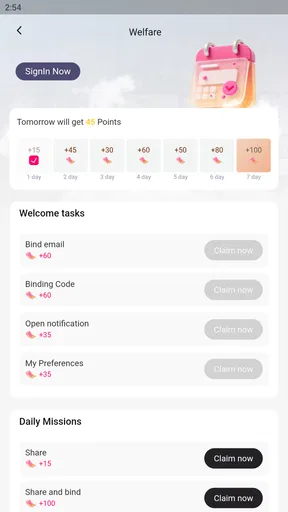
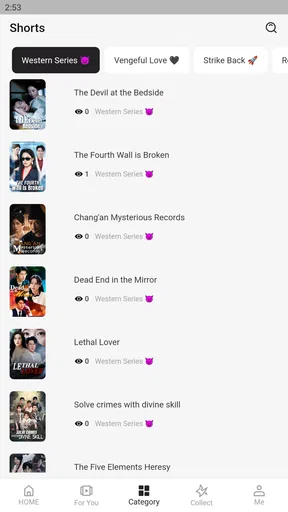
Our Review of OnSnap
 Analysis by Appyee
I approached OnSnap as a working tool rather than just another place to play audio. Its identity is tied to Chinese-language entertainment, and that makes the first question fairly practical: does it help me move from discovering something interesting to enjoying, sharing, or managing it without unnecessary friction? My experience is that it is most appealing when I want a focused entertainment space built around the Chinese-speaking community, not when I need a complete professional music-production suite.
It sits in the Music & Audio category and is free to install, with optional purchases ranging from $0.99 to $39.99 per item. That combination makes it easy to try before deciding whether it deserves a regular place on my phone. The app is intended for Everyone, and it runs on Android 7.0 or later, so the basic entry barrier is relatively low for people using older phones.
Starting with an idea instead of an empty project
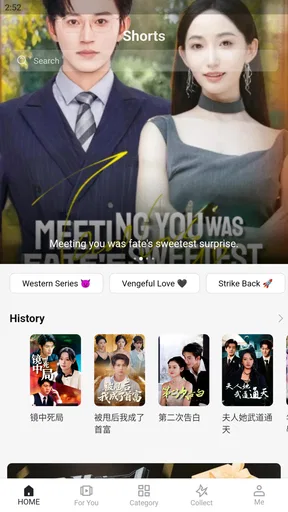
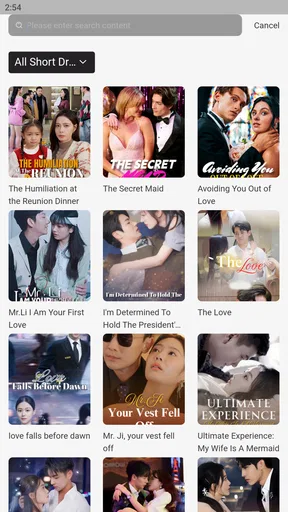
The store summary presents OnSnap as an entertainment platform for around 80 million ethnic Chinese users. I read that less as a promise that every user will find exactly the same material and more as a clue about its intended atmosphere: this is a community-oriented destination, with cultural and language context doing much of the work. If your starting point is a Chinese song, audio trend, or piece of entertainment, that focus can be more useful than opening a broad international service and searching through a much larger, less targeted catalogue.
That focus matters when I am beginning a creative task. Before editing or publishing anything, I usually need references: a sound, a mood, a performance style, or simply a sense of what people are currently enjoying. OnSnap works best at that discovery stage when the material I want is connected to Chinese-language entertainment. It can help narrow the search mentally, because I am not treating the app as a universal audio toolbox.
The short store description is simply “OnSnap,” so the name itself does not explain the workflow. I would not install it expecting a detailed project-management environment, a recording studio, or a replacement for a desktop editor. Instead, I see it as a place to explore and engage with entertainment, then decide whether something is worth saving, sharing, or carrying into another part of my creative process.
A realistic example is planning a short social post for a family celebration. I might open the app to find a culturally familiar audio reference, listen for a suitable mood, and use that discovery to shape the visual or spoken part of the post. The value is not necessarily that the app completes the whole project. Its useful role can be earlier and more human: helping me decide what kind of piece I want to make before I start assembling it.
That also explains who should skip it. If your starting point is multitrack recording, detailed waveform editing, audio cleanup, or precise control over a finished file, I would begin with a dedicated editor instead. OnSnap is better suited to the inspiration and entertainment side of the workflow than to technical production.
How I use the discovery stage efficiently
My first practical tip is to enter with a specific purpose. Rather than scrolling indefinitely, I would decide whether I am looking for a reference, a listening session, or something to share with another person. Community-focused entertainment apps can become time-consuming when browsing has no endpoint, and a simple goal makes it easier to tell whether the session was useful.
I also recommend treating the app as a source of direction, not automatically as the final home for every asset. If I am preparing content for another platform, I want to separate “this inspired my idea” from “I have the rights and tools to reuse this material.” OnSnap may help me identify a style or topic, but that does not by itself settle how I should publish someone else’s audio or performance.
The app’s rating is a 4.4 average from around 430 ratings, while the listing shows over 100 thousand installs. Those figures suggest that it has attracted a meaningful early audience, but I would still judge it by whether its cultural focus matches my own habits. A strong rating cannot make an entertainment catalogue relevant to someone who rarely consumes Chinese-language content.
Turning discovery into a repeatable making process
Once I have found something that helps shape an idea, I look for a clear path from listening to action. This is where my expectations become more cautious. OnSnap’s confirmed identity is that of a Music & Audio app, but I would not assume that means it includes the full set of tools found in specialist creator software. The safer way to use it is to let it support the concept and audience side of a project, while using a purpose-built editor for recording, cutting, mixing, or mastering when those jobs matter.
That division can actually make a workflow cleaner. I might use OnSnap to understand the kind of audio that fits a short clip, then switch to an editor where I can control timing and levels. Instead of forcing one app to do everything, I use each tool for the part it handles best. For a casual creator, this may prevent the common mistake of choosing an entertainment app and then becoming frustrated because it does not behave like a studio.
For a small creator team, the app can also act as a reference room. One person can explore ideas, another can handle visuals, and a third can decide how the final post should be presented. The important insight is that the app’s contribution may be editorial rather than technical: it can influence the choice of theme, tone, or audience without being the place where the finished project is assembled.
I would keep notes outside the app when a discovery matters. A short note containing the title, mood, intended use, and the reason I saved the idea is more useful than relying on memory after a long browsing session. This is especially helpful when several pieces sound similar. It turns casual listening into a small, repeatable creative brief.
Another useful habit is to test an idea in context before committing to it. Audio that feels right through headphones may compete with spoken dialogue or become distracting under a busy visual. I would listen while imagining the actual delivery format, then decide whether the reference still works. OnSnap can provide the starting point, but the final judgment belongs to the complete piece.
Where the app fits beside familiar alternatives
Compared with a broad music-streaming service, OnSnap’s appeal is its more specific cultural orientation. A mainstream service may offer stronger general discovery, broader playlists, and more mature tools for organizing a large personal library. I would choose that kind of service when I want international variety or a highly developed listening routine.
Compared with a social video platform, OnSnap may feel more focused if my interest is Chinese-language entertainment rather than an endless mixture of video, advertising, and unrelated trends. A social platform is usually better when immediate public reach, creator analytics, and rapid sharing are the main goals. OnSnap makes more sense when the content context itself is part of what I am looking for.
Compared with a dedicated audio editor, the difference is even clearer. An editor is the better option for trimming silence, balancing voice and music, arranging layers, and preparing a technically controlled master. I would not replace that tool with OnSnap. I would use the two in sequence if my project needed both cultural discovery and precise production.
This comparison also answers a common practical question: can OnSnap replace my usual music tools? In my view, no—not if “usual tools” means a streaming library, a professional editor, or a publishing dashboard. It can complement those tools by giving me a more targeted place to explore entertainment and form an idea.
Iteration: deciding what is worth keeping
Creative work rarely succeeds on the first attempt, so I pay attention to how an app supports repeated decisions. With OnSnap, I would use iteration mainly at the concept and selection stages. I can return to an idea, compare it with another reference, and ask whether it still fits the audience and purpose of my project. That is a different kind of iteration from adjusting a compressor or moving an audio clip by a fraction of a second.
One non-obvious trade-off is that a focused catalogue can make decisions faster while also narrowing the range of unexpected influences. If I already know the cultural direction of my project, that focus is a strength. If I am deliberately searching for unusual cross-genre ideas, a broader service may challenge me more. I would alternate between them rather than expecting one source to provide every creative surprise.
I also try not to confuse popularity with suitability. A well-liked piece may be recognizable, but it can make my work feel predictable or drown out the message I am trying to deliver. I would compare at least a couple of possible directions, then choose the one that supports the project rather than the one that merely attracts attention during browsing.
For a personal workflow, I would use a simple three-pass approach. First, I would collect a small group of references. Second, I would remove anything that does not match the intended audience or tone. Third, I would test the remaining choice against the actual draft. This keeps the app’s entertainment value from taking over the production process.
The optional purchase model is another point to consider during iteration. Because the app is free to start but includes individual in-app purchases, I would avoid buying anything while I am still exploring. I would first establish that the app fits my routine and that a purchase has a clear purpose. This is particularly important for younger users or shared devices, even though the content rating is Everyone.
The current version is 1.0.9, and the app was released on Jun 12, 2026. I would keep the app updated through the normal store process, especially if I depend on it for a recurring creative routine. A newer version can change the feel of navigation or how smoothly a workflow behaves, so I would not build an important deadline around an untested update.
Handoff, sharing, and the point where another tool takes over
The handoff stage is where I would be most deliberate. If OnSnap gives me an idea, I would record the decision in my project notes and move the actual production into the tool that matches the output. For a spoken clip, that could mean an editor with voice controls. For a visual post, it could mean a video app. For simple personal listening, no handoff may be needed at all.
This approach prevents a common workflow problem: assuming that discovering content and delivering finished content are the same job. They are not. Discovery asks whether something catches my attention. Delivery asks whether the final result is clear, balanced, properly timed, and appropriate for its destination. OnSnap is most valuable to me when I let it answer the first question without pretending it automatically answers the second.
If I were preparing a short family video, my handoff would look like this: explore a suitable reference in OnSnap, write down the creative direction, assemble the visuals and voice in my editing app, test the audio at a normal phone volume, and only then publish through the intended social or messaging service. That sequence is simple, but it avoids losing the original idea among too many browsing sessions.
I would also be careful with attribution and reuse. Finding an audio item inside an entertainment platform does not automatically mean I can extract it, alter it, or publish it commercially. My recommendation is to use the app for listening and inspiration unless the reuse terms are clear for the specific material. When the project is public or paid, I would choose properly licensed assets through a service designed for that purpose.
Another practical question is whether the app is suitable for an older phone. Since it supports Android 7.0 and later, it is not restricted to only the newest Android releases. Still, the experience will depend on the individual device, available storage, and general performance. I would keep enough free space for normal app operation and avoid judging the whole service from a phone that already struggles with other media apps.
The developer is 香港瀚洋國際控股集團有限公司. I would consider that information useful when checking the app’s identity in the store and making sure I am installing the intended product. Since the app is free to download, the main financial decision comes later: whether optional purchases add enough value to justify their cost for my own use.
My creator verdict after fitting it into a real routine
I see OnSnap as a targeted entertainment companion that can contribute to the beginning of a creative project. Its strongest quality is its Chinese-community orientation, which gives it a clearer personality than a completely general audio app. When I want culturally relevant inspiration, a listening break, or a reference for a piece aimed at Chinese-speaking friends and family, that focus can save time and make the discovery stage feel more natural.
Its limitations are just as important. I would not choose it as my only tool for recording, editing, organizing a professional production, or managing final delivery. The free entry point is convenient, but optional purchases mean I would keep an eye on spending rather than tapping through every appealing extra. I would also avoid treating the app’s audience focus as a guarantee that every genre, creator, or workflow will suit me.
For me, the best use is a two-tool or three-tool workflow: OnSnap for culturally specific discovery, a dedicated editor for making the piece, and the destination platform for publishing or sharing. That arrangement gives each stage a clear job. It is less glamorous than searching for one app that does everything, but it is more realistic and usually produces a cleaner result.
I would recommend trying it if you enjoy Chinese-language entertainment, want a focused source of creative references, or need a lightweight way to explore ideas before making something elsewhere. I would skip it if your priority is advanced audio engineering, a huge international catalogue, or a complete publishing system. My main recommendation is to use OnSnap as the spark and reference point, not as a substitute for the entire production chain.
That distinction is what makes the app worthwhile. It does not need to be a full studio to be useful. In the right routine, it helps me start with a stronger sense of audience and direction, then hand the project to tools that are better at the technical finish. For a free Music & Audio app with an Everyone rating and a clear cultural emphasis, that is a sensible role—and one I can imagine returning to when the right creative idea begins with listening.
Verdict
Strengths of OnSnap
- Quickly captures and shares spontaneous moments.
- Simple interface that is easy for new users to understand.
- Useful tools for adding creative touches to photos.
- Supports fast social sharing from within the app.
- Lightweight design keeps navigation responsive on most devices.
Limitations of OnSnap
- Some features may require in-app purchases or subscriptions.
- Photo quality can depend heavily on the device camera.
- Privacy settings may need careful review before sharing content.
- The app may feel limited for users wanting advanced editing tools.
- Performance can vary on older phones or tablets.
Similar Picks in This Category
View All
YouTube Music
Google LLC4.4

Samsung Music
Samsung Electronics Co., Ltd.3.8

Spotify: Music and Podcasts
Spotify AB4.3

JioSaavn - Music & Podcasts
Saavn Media Limited4.3

Lark Player:Music Player & MP3
Lark Player Studio - Music, MP3 & Video Player4.6

StarMaker: Sing Karaoke Songs
SKYWORK AI PTE. LTD.4.3
Frequently Asked Questions
What is OnSnap and what can I use it for?
OnSnap is a mobile application designed for creating, editing, and sharing visual content directly from your smartphone. Depending on the version available in your region, it may include tools for capturing images or videos, applying effects, adding text, and organizing content. Before downloading, check the official store description to confirm the currently supported features and whether it matches the type of content you want to create.
Is OnSnap free to download and use?
OnSnap may be available as a free download, but some features can require in-app purchases, a subscription, or account registration. Premium tools, additional effects, expanded storage, or an ad-free experience may not be included in the basic version. I recommend reviewing the pricing section in the Google Play Store or Apple App Store before installing, since costs and available plans can vary by device and country.
Does OnSnap require an account or an internet connection?
The requirements can depend on which features you use. Basic functions may work after installation, while sharing content, synchronizing data, accessing cloud-based tools, or using social features may require an account and an active internet connection. If privacy or mobile-data usage is important to you, review the permissions requested during setup and test the app over Wi-Fi before enabling automatic uploads or synchronization.
Is OnSnap safe and suitable for my device?
OnSnap should be downloaded only from its official Google Play Store or Apple App Store listing to reduce the risk of modified or unsafe files. Before installing, check the developer name, recent user reviews, update history, age rating, and requested permissions. Compatibility can vary by Android or iOS version, so confirm the minimum operating-system requirements and ensure your device has enough free storage.
What should I know about privacy when using OnSnap?
Because OnSnap may handle photos, videos, camera access, microphone input, location data, or account information, it is important to read its privacy policy before using it extensively. Review whether content is stored locally or uploaded to external servers, how long data is retained, and whether information is shared with partners. Grant only the permissions necessary for the features you intend to use.
